I've been running some form of server at home for many years now. I remember being given my Granddads old HP desktop and installing Windows Home Server on it and connecting to it at school and thinking it was so cool! I wouldn't be surprised if I had opened RDP to 0.0.0.0/0 but eh, it worked... kinda.
Over the years I've had a plethora of different hardware configurations, but never really built something that had a primary purpose in mind or I could rely on for storing important documents, pictures and services. This is why I decided to build my current server, with the focus on data integrity and security.
Rough spec sheet:
- Motherboard - MSI B550-A Pro
- CPU - AMD Ryzen 7 5700G
- Memory - 128GB DDR4 (Non ECC, did have 64GB ECC but decided to go to 128GB non-ECC to save $$)
- OS Storage: 2 x 1TB Samsung NVME SSD
- Data Storage: 2 x 16TB Ironwolf HDD's (RAID Z1 in ZFS)
- Read Cache: 1 x 512GB SATA SSD (ZFS L2ARC)
For the Operating System I went with Proxmox. I also added in an LSI SAS 9207-8i controller card to allow for direct PCI-E pass through in Proxmox to my TrueNAS VM. This allows TrueNAS to talk directly to the disks as if it were the same machine, rather than Proxmox adding a virtualisation layer between.

I chose TrueNAS because I wanted a method of centralising my data storage, whilst also giving me the flexibility to control how & what can access specific data. As an example, VM's that require the ability to store critical data can mount an NFS / SMB share within TrueNAS. I'm able to use ZFS snapshotting for backups (we'll talk about this later), as well as utilising the read-cache to reduce IO wait-times on the slower HDD's.
I guess a server isn't really a server if it's not serving anything, so these are the services I use. I've donated to a few of them and I suggest you do also if you like their work:
- Photos - Immich
- Email - Mailcow
- Passwords - Vaultwarden
- Authoritive Name Server - Technitium
- Monitoring - CheckMK / Beszel / Uptime Kuma / Grafana Stack
- SSO - PocketID
- Git - GitLab
- This Blog! - Ghost
- Public & Private reverse proxies - Traefik
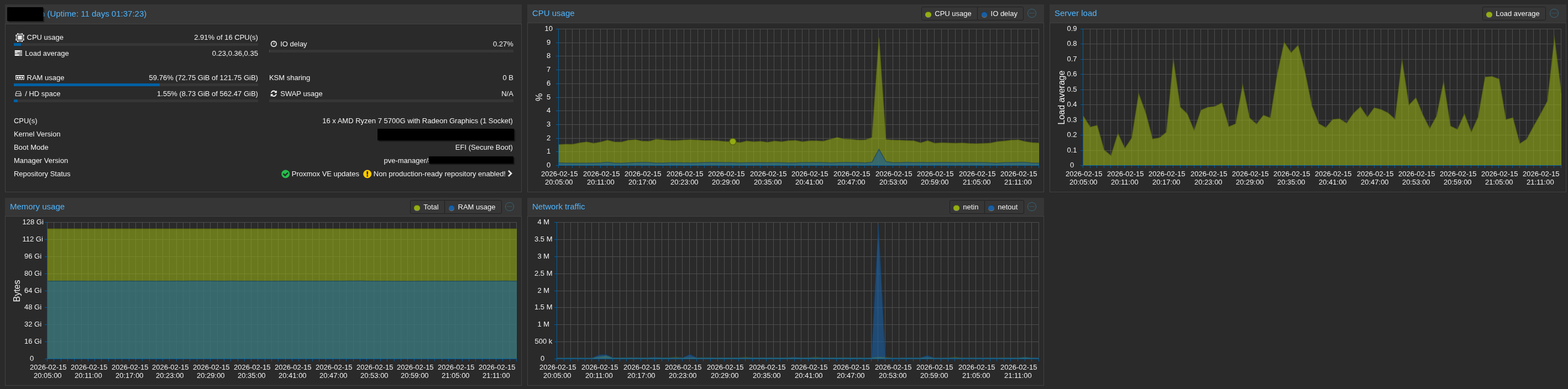
I've been running this build for around a year now and overall have been really impressed. You can see that I've got a lot of room left memory wise, and CPU / avg server load is barely being used. I assigned 32GB of memory to TrueNAS and increased the ZFS L2ARC size to 28GB.
When I originally uploaded all my photos into Immich, that made the usage go much higher. Immich does a lot of data processing / AI detection, which is super cool but definitely needs a lot of resources initially to do the first scan.
I mentioned that data integrity and security were very important in terms of this build, so I wanted to talk about backups - this was a tricky one.
As it currently stands I've got 16TB of available storage, but where can I back it up too? I did think of buying another 16TB HDD and running Proxmox Backup server at home and just backing up to that. Although it's a good idea, it means that it's another disk that'll eventually fail, additional power, management etc.. I then started looking at cloud backup options. After doing a bit of research, it was clear that BackBlaze was very popular amongst the r/selfhosted community. They offer multiple methods of communication with their services, including a object storage compatible with the AWS S3 API. They're also pretty cheap at only $6/TB.
Although BackBlaze offers disk encryption within their data buckets, I wanted to ensure the data I sent was encrypted using my own key. Enter Restic - a really awesome backup utility that integrates really nicely into Backblaze using the AWS S3 API, including filename encryption. I wrote a Bash script to automate the process, so depending on the VM, I use CRON to schedule my backups. Given all my VM's use LUKS disk encryption, doing backups at the file system level ensures I only backup data I care about and not pay for backup storage for data I don't.
EOF